
From homework to understanding.
Grade the work, explain the tricky part, practise it again and keep the progress in one place.
See every answer clearly.
Photograph the homework to see marks, corrections and feedback together. Review each attempted question alongside the original answer.
- Marks, score and processing time per question
- Their answer beside the correct one
- Explanations only where it went wrong
- Every question tagged by topic
- Parents can override a mark by hand
Hints first, answers last
Start with a hint, try the next step, and open more help when it is needed. The full solution is there when your child is ready for it.
- Hints leave room for your child to try first
- Enter an answer and check whether it is right
- Follow up with “I don't get it” or “give me an example”
- Switch between English and Chinese at any time
- The first 20 follow-ups in a session are free
Understand the idea, then work through the steps.
Start with the core idea, then explore the method and answer step by step. Common mistakes and tips help build understanding.
Still stuck? Watch it instead
When a question is still difficult, open a written explanation and a narrated animated lesson. Save the video under More → Saved videos to watch it again later.
- Generated for the specific question
- Narrated in Cantonese or English
- Save it and rewatch
Support for every step of learning.
Lesson mode
Explore the core idea, method and answer step by step, with common mistakes and learning tips.
Animated lesson videos
Generated for the question, narrated in Cantonese or English, ready in 1–2 minutes and saved for later. 3 a day on the free plan.
Question bank
Graded questions are saved and duplicates combined. Search by child, subject, grade or difficulty and compare answers with the reference solution.
From Mistakes to Mastery
Each grading adds to the learning record, helping you understand your child’s strengths and needs.
Grade
Homework graded in seconds. Every question is classified by topic and difficulty.
Understand
Error patterns and mastery levels update automatically — pinpointing exactly where your child stands on every topic.
Adapt
Worksheets adjust to your child's level. Past mistakes resurface at the right time. Difficulty grows with them.
Predict
Based on what your child has mastered (or hasn't), we flag upcoming topics they're likely to struggle with — before they get there.
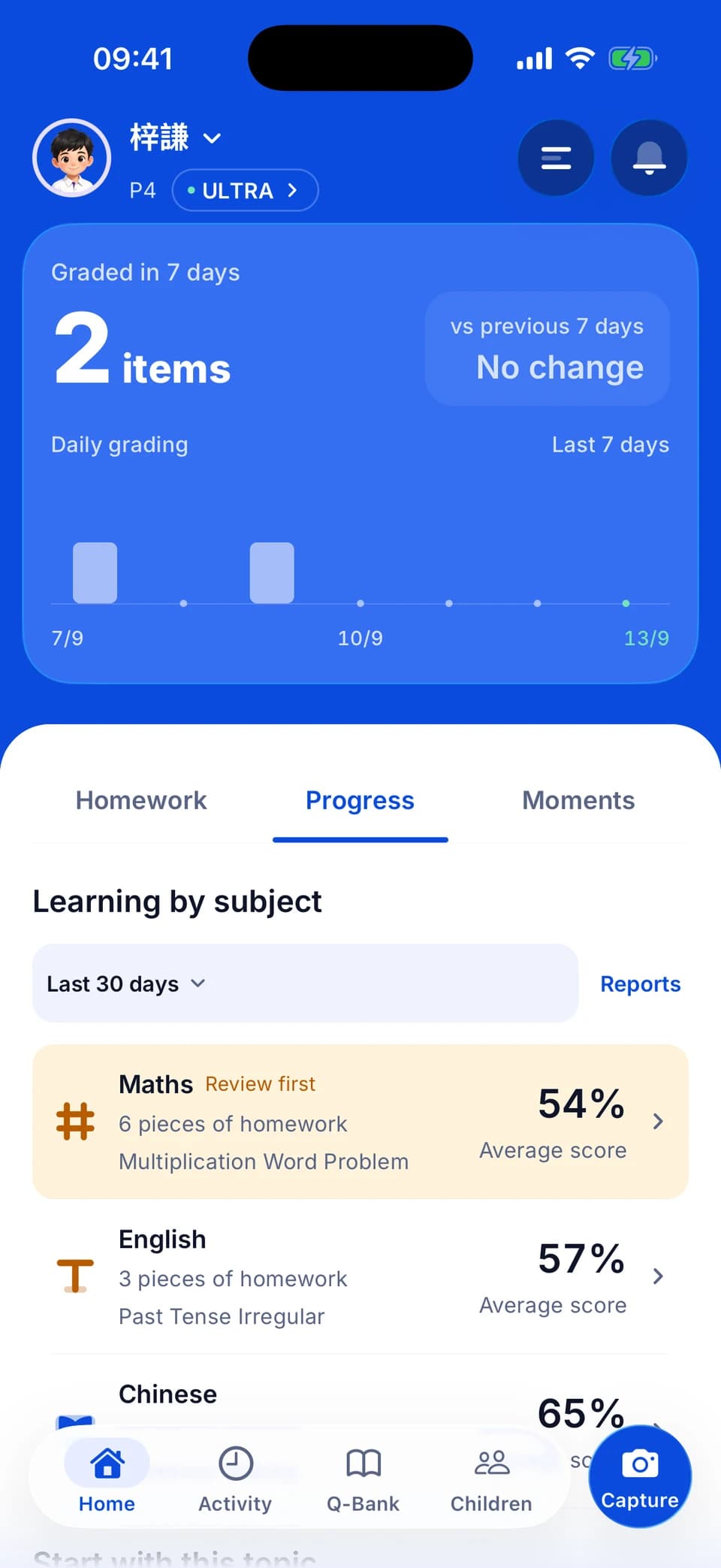
Difficulty That Grows With Them
Every topic has a mastery level. Worksheets automatically set the right difficulty for each area — easy where they need confidence, challenging where they're ready.
Mistakes That Come Back
Wrong answers don't just disappear. They resurface in future worksheets at the optimal interval — so your child truly masters the concept, not just moves on.
Predicts What's Coming
If fractions need more practice, revisiting them can help before learning ratios. The system uses links between topics to suggest useful preparation.
How They Compare
See your child's accuracy compared to other Tutor Wong students at the same grade. Percentile rankings by topic — no other child's data is ever revealed.
Practice aimed at the gaps
Choose the topics, difficulty and language, then print the worksheet or complete it on screen. Photograph the finished work for grading, and use the reports to see strengths and topics to revisit.
- Choose the subject, difficulty, question count and language
- Three modes: targeted practice, mixed practice and revision
- Reports by month, term, school year or all time
- Reports based on actual homework records
- The PDF language is set separately from the app language
One account, every homework night.
Homework lists, Moments, worksheets and reports — a separate profile for each child, one subscription for the family.
Study calendar and home-screen widgets
Photograph a handbook or whiteboard to organise homework and due dates. Add dictation and test dates to plan revision ahead. Three home-screen widgets let you check plans and mark tasks complete.
Moments and the school portfolio
Upload activities, awards and school photos as you go, and use AI to draft the captions. Choose a template when you need a printable portfolio PDF; free-plan exports carry a watermark.
A profile per child
One account for the family, with separate grading history, weak-topic tracking and recommendations for each child.
Kid mode
Your child signs in with their own PIN to a simplified screen, photographs their own homework and sees their own progress.
Family sharing
Up to 6 parent accounts and 10 devices on Ultra, all seeing the same children on one subscription.
Built-in guides
Explore 18 illustrated guides and interactive tours on three main screens to get familiar with the app.
Remembers Monday's mistakes. Ready for Friday's homework.
Tailored tutoring means remembering strengths, weaknesses, and pace — not starting from zero each session.
| Why we're different | Tutor Wong | ChatGPT / Gemini |
|---|---|---|
| Remembers your child's history | ||
| Tracks mastery across every topic | ||
| Adjusts difficulty automatically | ||
| Predicts future weak areas | ||
| Compare with students in the same grade | ||
| Aligned with HK curriculum K1–S6 |
Your child's next homework. Sorted.
Homework help that remembers your child and grows with them — 24/7, tailored to how they learn.
Free to start · Upgrade inside the app only when you need more